
ANDROID
REB EA Control App for Android
Monitor and control your REB EA directly from supported Android devices.
Give clients a clean place to download the official setup file, read installation steps, and contact support if they need help connecting MT5.
Use this download area for the official ReachEmpireBot installer. Replace the file at the path below whenever a new version is ready.
For the smoothest setup, prepare your MT5 account, preferred symbols, and risk settings before running the installer.
Choose your mobile platform. The Android and iOS download buttons are ready to connect to the official app links.
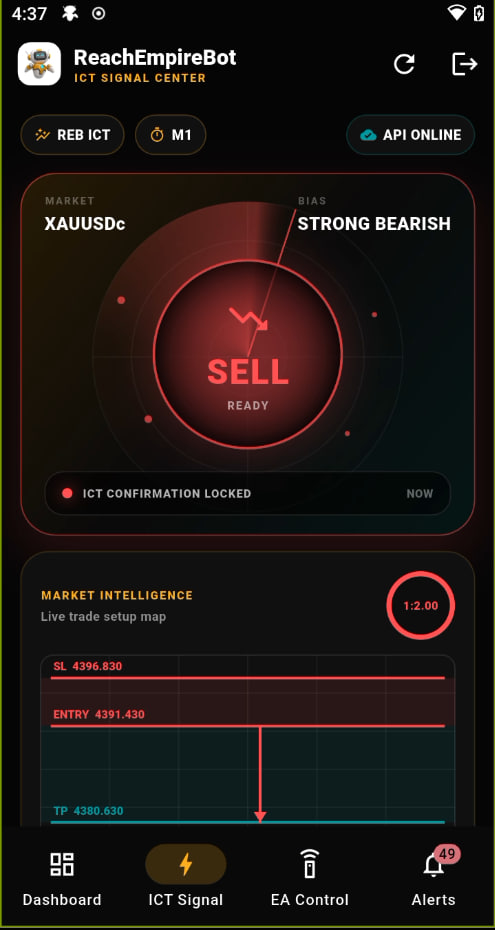
Monitor and control your REB EA directly from supported Android devices.
Monitor and control your REB EA directly from supported iPhone and iOS devices.
Get the official setup file from this page.
Run the installer on the trading computer or VPS.
Prepare MT5 and the symbols your bot will monitor.
Confirm risk settings and start supervised automation.
Please read these terms before downloading and using the ReachEmpireBot Trading Bot Tool.
Trading Bot Tool Usage Policy
Please read and understand the following Terms & Conditions carefully before using the Trading Bot Tool.
By registering, accessing, or using this Tool, the User agrees to comply with all terms stated below.
Users are allowed to use the Trading Bot Tool free of charge for a period of 7 days as a trial.
After the trial period ends, Users must pay a service fee of $30 per month to continue using the Tool.
Users registered under the Referral Program may receive free access or special fee exemptions based on Developer conditions.
If the User fails to pay the required service fee on time, the Developer reserves the right to suspend or terminate access to the Tool without prior notice.
Users are required to share 30% of trading profits with the Developer.
Profit payments may be made daily, weekly, or monthly depending on the agreement between the User and the Developer.
If the User fails to provide the agreed profit sharing, the Developer reserves the right to disable the License or suspend the Account immediately.
Users must fully understand how to use the Trading Bot Tool before enabling Auto Trading features.
Users are fully responsible for their own trading decisions and usage of the Tool.
The Developer shall not be held responsible for financial losses, loss of capital, trading risks, or any damages resulting from the use of the Tool.
Forex, Crypto, Gold, and other financial market trading involve high risk.
The Trading Bot Tool does not guarantee 100% profit.
Past performance does not guarantee future results.
Each License may only be used on 1 Device / 1 PC.
Changing hardware or transferring the License to another device may require Developer approval.
Users are strictly prohibited from sharing, reselling, cracking, modifying, or redistributing the Tool without Developer permission.
If any violation is detected, the Developer reserves the right to permanently disable the License or Account without refund.
Users are responsible for maintaining stable Internet connection, VPS service, MT5 platform, and broker server connection.
The Developer is not responsible for Internet disconnection, VPS failure, MT5 crash, broker delays, slippage, spread increases, server errors, trade execution problems, or any other technical issues.
All payments made are non-refundable.
Exceptions may only apply if specifically approved by the Developer.
All Bot strategies, source codes, system logic, designs, and technical information are the intellectual property of the Developer.
Users are prohibited from reverse engineering, decompiling, modifying code, attempting to hack the system, copying strategies, or any unauthorized attempt to access or duplicate the system.
The Developer reserves the right to suspend, disable, or terminate any License or Account at any time if the User fails to pay service fees, fails to share profits, shares the Tool illegally, uses the Tool for unlawful purposes, or causes harm to the system or Developer.
This action may be taken without prior notice.
The Developer reserves the right to modify, update, add, or remove any Terms & Conditions at any time when necessary.
Changes may occur without prior notification.
By registering or using the Trading Bot Tool, the User acknowledges that they have read, understood, and agreed to all Terms & Conditions stated above.
គោលការណ៍ប្រើប្រាស់ឧបករណ៍ Trading Bot
សូមអាន និងយល់អំពីលក្ខខណ្ឌខាងក្រោមឱ្យបានច្បាស់ មុនពេលប្រើប្រាស់ឧបករណ៍ Trading Bot។
ការចុះឈ្មោះ ចូលប្រើ ឬប្រើប្រាស់ឧបករណ៍នេះ មានន័យថាអ្នកប្រើប្រាស់យល់ព្រមគោរពតាមលក្ខខណ្ឌទាំងអស់ខាងក្រោម។
អ្នកប្រើប្រាស់អាចសាកល្បងឧបករណ៍ Trading Bot ដោយឥតគិតថ្លៃរយៈពេល 7 ថ្ងៃ។
បន្ទាប់ពីរយៈពេលសាកល្បង អ្នកប្រើប្រាស់ត្រូវបង់ថ្លៃសេវាប្រចាំខែតាមការកំណត់របស់អ្នកអភិវឌ្ឍន៍។
ប្រសិនបើមិនបានបង់ថ្លៃសេវាទាន់ពេល អ្នកអភិវឌ្ឍន៍មានសិទ្ធិផ្អាក ឬបញ្ឈប់ការចូលប្រើឧបករណ៍ដោយមិនចាំបាច់ជូនដំណឹងជាមុន។
អ្នកប្រើប្រាស់ត្រូវចែករំលែក 30% នៃប្រាក់ចំណេញពីការជួញដូរជាមួយអ្នកអភិវឌ្ឍន៍។
ប្រសិនបើមិនអនុវត្តតាមកិច្ចព្រមព្រៀង អ្នកអភិវឌ្ឍន៍អាចបិទ License ឬផ្អាកគណនីភ្លាមៗ។
អ្នកប្រើប្រាស់ត្រូវយល់ច្បាស់ពីរបៀបប្រើឧបករណ៍ មុនពេលបើកមុខងារ Auto Trading និងទទួលខុសត្រូវចំពោះការកំណត់ហានិភ័យរបស់ខ្លួន។
ការជួញដូរមានហានិភ័យ ហើយលទ្ធផលពីមុនមិនធានាលទ្ធផលនាពេលអនាគតទេ។
License នីមួយៗអាចប្រើបានតែលើឧបករណ៍ ឬកុំព្យូទ័រមួយប៉ុណ្ណោះ។ ហាមចែករំលែក លក់បន្ត ផ្ទេរ កែប្រែ ឬចែកចាយឧបករណ៍ដោយគ្មានការអនុញ្ញាត។
អ្នកប្រើប្រាស់ទទួលខុសត្រូវក្នុងការរក្សាអ៊ីនធឺណិត VPS កម្មវិធី MT5 និងការតភ្ជាប់ទៅម៉ាស៊ីនមេ Broker ឱ្យមានស្ថិរភាព។
អ្នកអភិវឌ្ឍន៍មិនទទួលខុសត្រូវចំពោះការដាច់អ៊ីនធឺណិត បញ្ហា VPS/MT5 ការយឺតយ៉ាវ Slippage Spread ឬបញ្ហាបច្ចេកទេសផ្សេងៗទេ។
ការទូទាត់ទាំងអស់មិនអាចសងវិញបានទេ លើកលែងតែមានការអនុម័តជាក់លាក់ពីអ្នកអភិវឌ្ឍន៍។
យុទ្ធសាស្ត្រ Source Code ប្រព័ន្ធ Design និងព័ត៌មានបច្ចេកទេសទាំងអស់ ជាកម្មសិទ្ធិបញ្ញារបស់អ្នកអភិវឌ្ឍន៍។ ហាម Reverse Engineering កែប្រែកូដ Hack ឬចម្លងប្រព័ន្ធដោយគ្មានការអនុញ្ញាត។
អ្នកអភិវឌ្ឍន៍អាចផ្អាក បិទ ឬបញ្ឈប់ License/គណនី ប្រសិនបើអ្នកប្រើប្រាស់មិនគោរពលក្ខខណ្ឌ ប្រើប្រាស់ខុសច្បាប់ ឬបង្កការខូចខាតដល់ប្រព័ន្ធ។
អ្នកអភិវឌ្ឍន៍មានសិទ្ធិកែប្រែ ធ្វើបច្ចុប្បន្នភាព បន្ថែម ឬដកលក្ខខណ្ឌនៅពេលចាំបាច់។
តាមរយៈការចុះឈ្មោះ ឬប្រើប្រាស់ឧបករណ៍ Trading Bot អ្នកប្រើប្រាស់បញ្ជាក់ថាបានអាន យល់ និងយល់ព្រមតាមលក្ខខណ្ឌទាំងអស់ខាងលើ។
交易机器人工具使用政策
在使用 Trading Bot Tool 之前,请仔细阅读并理解以下条款与条件。
注册、访问或使用本工具,即表示用户同意遵守以下所有条款。
用户可免费试用 Trading Bot Tool 7 天。
试用期结束后,用户必须每月支付 30 美元的服务费,才能继续使用本工具。
通过推荐计划注册的用户,可根据开发者规定获得免费使用权或特别费用减免。
如果用户未按时支付所需服务费,开发者有权暂停或终止用户对本工具的访问,且无需提前通知。
用户须将交易利润的 30% 与开发者分享。
利润支付可按日、按周或按月进行,具体取决于用户与开发者之间的约定。
如果用户未按约定提供利润分成,开发者有权立即停用 License 或暂停账户。
在启用自动交易功能之前,用户必须充分了解 Trading Bot Tool 的使用方法。
用户须对自己的交易决定以及本工具的使用承担全部责任。
因使用本工具而产生的财务损失、资金损失、交易风险或任何其他损害,开发者不承担责任。
Forex、Crypto、Gold 以及其他金融市场交易均具有高风险。
Trading Bot Tool 不保证 100% 盈利。
过去的表现不代表未来的结果。
每个 License 仅可用于 1 台设备 / 1 台电脑。
更换硬件或将 License 转移到其他设备时,可能需要获得开发者批准。
未经开发者许可,严禁用户分享、转售、破解、修改或重新分发本工具。
如发现任何违规行为,开发者有权永久停用 License 或账户,且不予退款。
用户负责保持稳定的 Internet 连接、VPS 服务、MT5 平台以及 Broker 服务器连接。
对于 Internet 断线、VPS 故障、MT5 崩溃、Broker 延迟、滑点、点差扩大、服务器错误、交易执行问题或任何其他技术问题,开发者不承担责任。
所有已支付款项均不予退款。
仅在开发者明确批准的特殊情况下,才可能适用例外。
所有 Bot 策略、源代码、系统逻辑、设计及技术信息均为开发者的知识产权。
严禁用户进行逆向工程、反编译、修改代码、尝试入侵系统、复制策略,或进行任何未经授权的系统访问或复制行为。
如果用户未支付服务费、未分享利润、非法分享本工具、将本工具用于非法目的,或对系统或开发者造成损害,开发者有权随时暂停、停用或终止任何 License 或账户。
上述措施可在无需提前通知的情况下执行。
开发者有权在必要时随时修改、更新、增加或删除任何条款与条件。
相关变更可能在不提前通知的情况下进行。
注册或使用 Trading Bot Tool,即表示用户确认已阅读、理解并同意上述所有条款与条件。